Showing posts with label Environment: 3D Uncanny Scene. Show all posts

Friday, 21 January 2011

EVALUATION OF UNIT 3

This Unit was all about 3D, a real introduction to the production of a 3D scene. There is one thing I’ve learnt about designing a 3D set: It’s amazingly hard to build up and requires al lot of dedication. The amount of work we had to produce this time was twice as much as last time and looking back to the first project we had I am thinking: “Oh my God, that Unit was so much easier!”. I guess this is a good sign, a sign that we are becoming better and quicker in such a short amount of time. I never thought I would be able to design a 3D set especially after all this trouble with Maya <=……(>_<)… 
But I finally made it and created a fairly satisfying scene for my skills in this area. I was enjoying and was simultaneously feeling anxious about the process. I gained knowledge on texturing,, lighting and learned a lot about different effects than can bring your ideas into life. I am looking forward to the next Unit and learn a lot more. For now it’s time for a break after all this “Uncanny Overdose” which is still hovering in my mind! Yay! Reading week at last! :D

Digital Set Pipeline

Thumbnails
Concept art
Matte Painting
Untextured Model
Wireframe
Textured Model

Mental Ray

Ambient Occlusion

Z-Depth

Final 3D scene

Wednesday, 19 January 2011

Final Scene Combined with Matte Painting

My scene is officially done and ready to be combined with the matte painting.
 When I put my scene and painting together I realised the colours did not match so I left the curves and levels do their magic. Is the city in the horizon still working though?

Lighting Tests

I think this is the stage where you begin to have doubts for your 3D scene. Everything is ready apart from the lighting which needs a lot of experimentation and dedication. The lighting plays a mojor role in your whole scene which is what will add the unacanny touch to it. I've been playing around with mental ray lighting and even lighted up some of the lanterns. I am not sure what works better yet. Probably the last one.
Struggling to get a sharp shadow.


Functioning the light colour and tensity.
Quick render.
Lighting up random lanterns.

Tuesday, 18 January 2011

Some progress...

I was in a bit of a dilemma for the ground. At first I added a plane and played around with the sculpt geometry tool to get some sort of sand-blown bumps.
..but that was increasing the file size and wasn't looking realistic enough.

So I added an actual image to make it more interesting.
Sand Tile
Adding the Mental-Ray lighting and vuala! the scene is finally looking more realistic :)

What's left to do is try and make the shadow of the swing look long but simultaneously keep the buildings as visible as possible.

Got the long shadow here but the scene looks dark.

Even longer shadow here but with horrible buildings.

Street and texturing done!

I am finally done with the street and I can now see my scene coming into life. The texturing wasn't too hard to do and considering the prospective I chose, you won't be able to see most of it. I decided to leave the buldings look rather new than decayed (or is it better the other way round? ).


I am pleased with all the detail I've been working on but sad that it won't be very visible.
All I need to do now is add the ground which will probably be a deserted-like sandy one. Oh and of course the lighting which will create some long ominous shadows and finally give it a more uncanny touch.

Sunday, 16 January 2011

Matte Painting-Official or not?

I did a few adjustments since last time. I basically added a few more clouds (or fumes most likely cause they appear around the city) and highlighted the top ones. I am not sure if it's too much and makes the city less visible? Should I work on it more or should I leave it as it is?

Friday, 14 January 2011

Progress with the matte painting


So this is my matte painting which is supposed to extend the horizon. My industrialised area in the distance is far more exciting than the one on my concept painting. A few more clouds me thinks :)

Thursday, 13 January 2011

Final Scene-Viewing through camera

So I am basically done with the actual 3D scene. I've put all my models together to see if I can get the same effect as the concept painting. The only thing I am a bit concerned of is the skyscrapers which will be in the distance. I am not sure where to place them, or what scale to use to make them visible and still not making them look "oddly" placed. Also, What about the texturing? Should I just delete the parts of the building that are not visible to the camera?


Concept painting


Wednesday, 12 January 2011

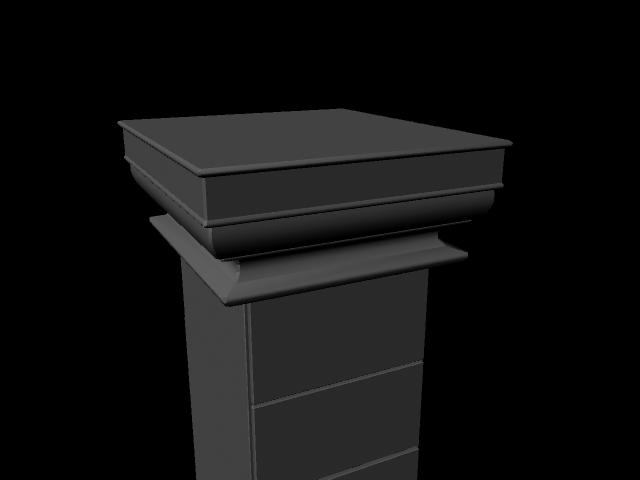
Archways and columns done!

I can now see my scene coming to life! All I need to model now is the walls, the roof and the buildings in the distance, put all the bits and pieces together and probably do a few more changes if I have enough time.


Balcony done!

So this is my balcony with the shutters and my first lantern model. It took a while to do-actually twice as much as the changes were not saved the first time with the result of loosing nearly the whole file! Well, there is one thing I've learnt today: keep saving your work!